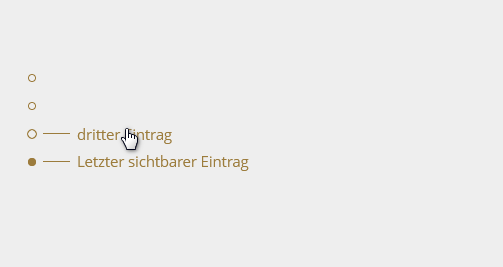
The **Dot Navigation** module creates an elegant dot navigation for one-page websites. The navigation is fixed to the right or left edge of the screen and indicates which section the visitor is currently viewing (scroll-spy). Hovering over a dot reveals the section label.
### Features
- Automatic detection of the active section (scroll-spy)
- Hover effect shows section label with connecting line
- Position: right or left, freely configurable distance from edge
- Breakpoint: navigation is only shown above a defined screen width
- Adjustable font size – dot and line scale automatically
- Colour: one colour for all elements or separate colours for dot, line and text
- Consistent hover area for all menu entries regardless of label length
- Accessible navigation (ARIA attributes)
- Language support: German and English
### Installation
1. Upload the ZIP file in the WBCE backend under **Add-ons → Modules**
2. Install the module
3. Add a new section of type **Dot Navigation** to the desired page
### Setup
1. Edit the page in the backend
2. Click edit on the **Dot Navigation** section
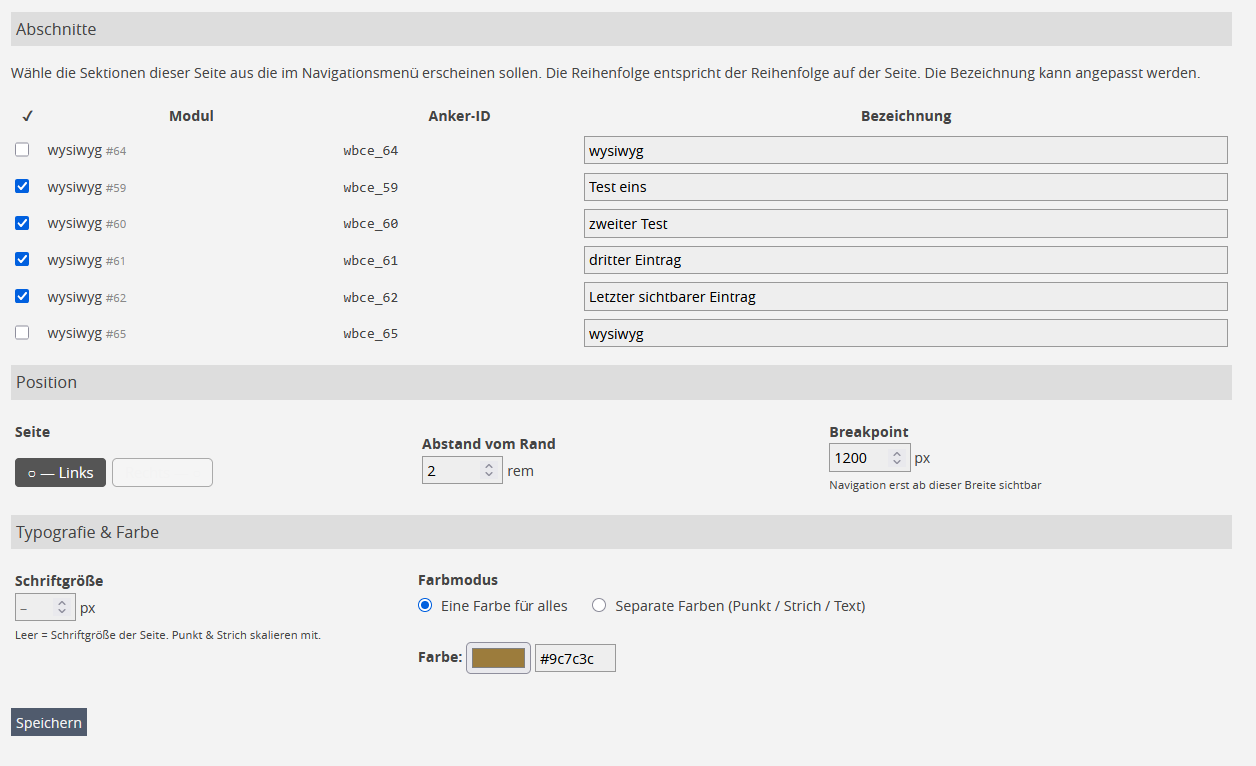
3. Select the sections to show in the menu (checkbox) and adjust labels
4. Configure position, font size and colour
5. Save
### Requirements
- WBCE CMS 1.4.0 or higher
- PHP 7.0 or higher
- Page sections must be available in the HTML as `` – WBCE handles this automatically
Das Modul **Dot Navigation** erzeugt eine elegante Punktnavigation für OnePager-Websites. Die Navigation erscheint fest positioniert am rechten oder linken Bildschirmrand und zeigt an, in welchem Abschnitt der Seite sich der Besucher gerade befindet (Scroll-Spy). Beim Hover über einen Punkt erscheint die Bezeichnung des Abschnitts.
### Funktionen
- Automatische Erkennung des aktiven Abschnitts (Scroll-Spy)
- Hover-Effekt zeigt Abschnittsbezeichnung mit Verbindungsstrich
- Position: rechts oder links, frei konfigurierbarer Randabstand
- Breakpoint: Navigation wird erst ab einer bestimmten Bildschirmbreite angezeigt
- Schriftgröße einstellbar – Punkt und Strich skalieren automatisch mit
- Farbe: eine Farbe für alle Elemente oder separate Farben für Punkt, Strich und Text
- Gleichmäßiger Hover-Bereich für alle Menüeinträge
- Barrierefreie Navigation (ARIA-Attribute)
- Sprachunterstützung: Deutsch und Englisch
### Installation
1. ZIP-Datei im WBCE-Backend unter **Erweiterungen → Module** hochladen
2. Modul installieren
3. Auf der gewünschten Seite einen neuen Abschnitt vom Typ **Dot Navigation** hinzufügen
### Einrichtung
1. Im Backend die Seite bearbeiten
2. Im Abschnitt **Dot Navigation** auf Bearbeiten klicken
3. Sektionen auswählen die im Menü erscheinen sollen (Checkbox) und Bezeichnungen anpassen
4. Position, Schriftgröße und Farbe konfigurieren
5. Speichern
### Voraussetzungen
- WBCE CMS 1.4.0 oder höher
- PHP 7.0 oder höher
- Die Sektionen der OnePager-Seite müssen im HTML als `` vorhanden sein – das erledigt WBCE automatisch
 WBCE CMS Add-On Repository (AOR)