The module automatically displays logos as a horizontal slider and supports multiple instances per website as well as usage inside normal WBCE pages and FlexLayout containers.
---
# Features
- Responsive layout
- Separate settings for:
- Desktop
- Tablet
- Mobile
- Configurable breakpoints
- Step mode (automatic step-by-step sliding)
- Adjustable interval
- Multiple instances per website supported
- Supports normal WBCE pages
- Supports FlexLayout
- No external libraries required
- Logos are automatically loaded from the media folder
- Continuous mode (smooth endless scrolling)
- Multi-language support (DE / EN / NL)
- FTAN protection integrated
- WBCE admin wrapper integrated
---
# Media Folder
Logos are automatically loaded from the following folder:
/media/logo_slider/{SECTION_ID}/
Example:
/media/logo_slider/12/01.png
/media/logo_slider/12/02.png
/media/logo_slider/12/03.png
The display order is automatically based on the filenames.
---
# Supported Image Formats
- PNG
- JPG
- JPEG
- GIF
- WEBP
Uppercase and lowercase file extensions are supported.
---
# Backend Settings
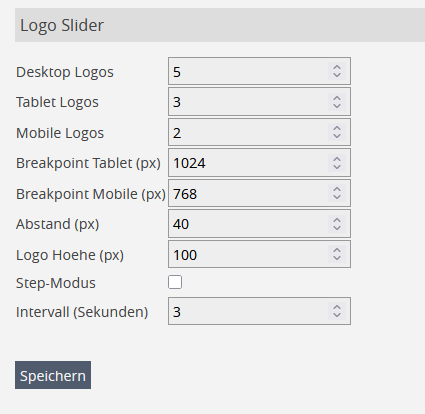
- Desktop logo count
- Tablet logo count
- Mobile logo count
- Tablet breakpoint
- Mobile breakpoint
- Gap between logos
- Logo height
- Step mode
- Interval in seconds
---
# Technical Notes
- The module does not use external slider libraries
- Layout calculation is handled via JavaScript
- Multiple instances on the same page are supported
- Works inside FlexLayout and normal WBCE pages
- Data is stored per `page_id` and `section_id`
- CSS is injected into the `
` using the WBCE placeholder system
- Media folders are created automatically
Das Modul zeigt Logos automatisch als horizontalen Slider an und unterstützt mehrere Instanzen pro Website sowie die Verwendung innerhalb normaler WBCE-Seiten und FlexLayout-Container.
---
# Funktionen
- Responsive Darstellung
- Separate Einstellungen für:
- Desktop
- Tablet
- Mobile
- Frei definierbare Breakpoints
- Step-Modus (automatisches Weiterschieben)
- Einstellbares Intervall
- Mehrere Instanzen pro Website möglich
- Unterstützt normale WBCE-Seiten
- Unterstützt FlexLayout
- Keine externen Bibliotheken erforderlich
- Logos werden automatisch aus dem Medienordner geladen
---
# Installation
1. ZIP-Datei im WBCE-Backend hochladen
Erweiterungen → Module → ZIP auswählen → Installieren
2. Modul auf einer Seite einfügen
3. Für jede Modul-Section einen Medienordner anlegen
---
# Medienordner
Die Logos werden automatisch aus folgendem Ordner geladen:
/media/logo_slider/{SECTION_ID}/
Beispiel:
/media/logo_slider/12/01.png
/media/logo_slider/12/02.png
/media/logo_slider/12/03.png
Die Reihenfolge erfolgt automatisch über die Dateinamen.
---
# Unterstützte Bildformate
- PNG
- JPG
- JPEG
- GIF
- WEBP
Groß-/Kleinschreibung der Dateiendungen wird automatisch erkannt.
---
# Backend-Einstellungen
- Anzahl Logos Desktop
- Anzahl Logos Tablet
- Anzahl Logos Mobile
- Breakpoint Tablet
- Breakpoint Mobile
- Abstand zwischen Logos
- Logo-Höhe
- Step-Modus
- Intervall in Sekunden
---
# Technische Hinweise
- Das Modul verwendet keine externen Slider-Bibliotheken
- Die Layout-Berechnung erfolgt per JavaScript
- Mehrere Instanzen auf derselben Seite werden unterstützt
- Funktioniert innerhalb von FlexLayout und normalen WBCE-Seiten
- Daten werden pro page_id und section_id gespeichert
 WBCE CMS Add-On Repository (AOR)